# Laravel Number::forHumans(): 1.23 million, not 1,230,000
> Format 1,230,000 as 1.23 million or 1.23M in PHP, before Vue ever sees the raw count. Default precision rounds 1,500 to 2 thousand. 23 Pest tests.
- URL: https://laravel-vuejs.space/laravel-number-forhumans-abbreviate
- Author: Anass Ez-zouaine (https://laravel-vuejs.space/author/anass-ez-zouaine)
- Published: 2026-11-16
- Topics: Laravel, PHP, Inertia, VueJs
Your dashboard query returns 1,230,000 and the Vue page prints it as a wall of digits. So you write a little divide-by-1,000 helper, and 999,500 comes out as `1000K`. Laravel already has two helpers for this: `Number::forHumans()` and `Number::abbreviate()`.
> **TL;DR**
>
> - `Number::forHumans(1_230_000, precision: 2)` is `1.23 million`. `Number::abbreviate(...)` with the same arguments is `1.23M`. `abbreviate()` is just `forHumans()` with `abbreviate: true`.
> - The default precision is 0, so `Number::forHumans(1500)` is `2 thousand` and `Number::abbreviate(1500)` is `2K`. Pass `precision: 1` when you want `1.5 thousand`.
> - Both helpers go through `Number::format()`, so they need the `intl` PHP extension. A plain `0` is the exception: it returns `"0"` without calling `format()`.
> - Unit words stay in English even when the locale changes the digits. `Number::withLocale('de', fn () => Number::forHumans(1_230_000, precision: 2))` is `1,23 million`, not a German word for million.
>
> **What you'll learn**
>
> - How `Number::forHumans()` and `Number::abbreviate()` turn 1,230,000 into 1.23 million or 1.23M
> - Why the default precision rounds 1,500 to 2 thousand, and how `precision` / `maxPrecision` change that
> - Wiring the helpers into a Vue + Inertia dashboard so the page receives display-ready strings
> - The gotchas: the intl extension, English unit words, and stacked units past a quadrillion
>
> **Who it's for:** Laravel + Vue developers formatting dashboard counts, admin totals and shared Inertia props on the server
>
> **Tested with:** Laravel 13.42 · PHP 8.4 · Pest 4 · intl enabled (23 tests, 70 assertions)
Sponsor
## What Number::forHumans() is, and why people miss it
`Number::forHumans()` takes a number and returns a string you can put on a dashboard: thousands, millions, billions, trillions, quadrillions. `Number::abbreviate()` does the same job with short suffixes: `K`, `M`, `B`, `T`, `Q`.
The official docs use the same three values for both:
`app/Http/Controllers/DashboardController.php`
```php
use Illuminate\Support\Number;
Number::forHumans(1000);
// 1 thousand
Number::forHumans(489939);
// 490 thousand
Number::forHumans(1_230_000, precision: 2);
// 1.23 million
Number::abbreviate(1000);
// 1K
Number::abbreviate(489939);
// 490K
Number::abbreviate(1_230_000, precision: 2);
// 1.23M
```
`forHumans()` arrived with the `Number` class in Laravel 10.33.0 on 21 November 2023 ([PR #48845](https://github.com/laravel/framework/pull/48845)). `abbreviate()` followed two weeks later in 10.35.0, on 5 December 2023 ([PR #49197](https://github.com/laravel/framework/pull/49197)). Every 11.x, 12.x and 13.x app already has both. People miss them because the need shows up as “make this count shorter” and the habit is a divider in Vue or a 10-line PHP helper, and because the docs file them under the long helpers list, among `clamp()`, `currency()` and `fileSize()`.
`abbreviate()` is not a separate formatter. It calls `forHumans(..., abbreviate: true)` and swaps the suffixes. In the lab, `Number::abbreviate(1_230_000, precision: 2)` and `Number::forHumans(1_230_000, precision: 2, abbreviate: true)` were the same string.
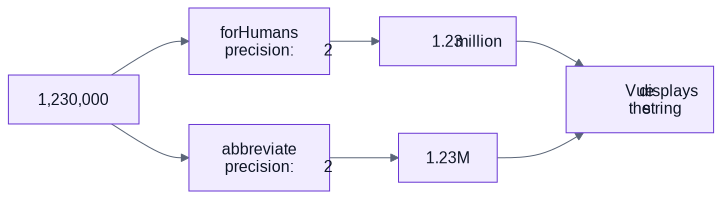
_Format the count on the server. Vue just prints the string._
## The usual way vs Number::abbreviate()
The helper below is what we had in the lab before switching. It is fine for 1,230,000. It is also how 999,500 becomes `1000K`:
**A divide-by-1,000 helper:**
`app/Support/Counts.php`
```php
function compactCount(int|float $n): string
{
if ($n >= 1_000_000) {
return round($n / 1_000_000, 2).'M';
}
if ($n >= 1_000) {
return round($n / 1_000).'K';
}
return (string) $n;
}
compactCount(1_230_000); // 1.23M
compactCount(1_500); // 2K
compactCount(999_500); // 1000K
```
**Number::abbreviate() / forHumans():**
`app/Http/Controllers/DashboardController.php`
```php
use Illuminate\Support\Number;
Number::abbreviate(1_230_000, precision: 2); // 1.23M
Number::abbreviate(1_500, precision: 1); // 1.5K
Number::abbreviate(999_500); // 1M
Number::forHumans(1_230_000, precision: 2); // 1.23 million
Number::forHumans(1_500, precision: 1); // 1.5 thousand
Number::forHumans(999_500); // 1 million
```
In the lab, values under 1,000 stayed as themselves: `42`, `500`, `999`. `12,345` became `12 thousand`, or `12.345 thousand` with `precision: 3`. `1,500,000,000` with the default precision became `2 billion`.
The rollover matters. `999,500` rounds to 1,000 thousands, and a current Laravel release steps up a unit: `1 million` / `1M`, not `1,000 thousand`. That fix shipped in Laravel 13.6.0 ([PR #59692](https://github.com/laravel/framework/pull/59692), 21 April 2026). With `precision: 1`, the same number stays `999.5 thousand`, because the formatted value has not reached 1,000 yet.
## Precision is the whole trick
The default precision is 0. That is why `Number::forHumans(1500)` is `2 thousand` and `Number::abbreviate(1500)` is `2K`. `1,499` goes the other way: `1 thousand` / `1K`. Pass `precision: 1` and both 1,500 and 1,499 become `1.5 thousand`.
`maxPrecision` is the sibling of `precision`. `precision: 2` always prints two decimal places; `maxPrecision: 2` prints at most two and drops trailing zeros. In the lab, `Number::forHumans(1_000_000, precision: 2)` was `1.00 million`, and `Number::forHumans(1_000_000, maxPrecision: 2)` was `1 million`. For `1,234,567` both options returned `1.23 million`.
If you are putting these strings on a dashboard, start with `precision: 1` or `precision: 2`. The default is for when a rounded whole unit is what you actually want.
## Real-world example: a Vue + Inertia dashboard
Format the counts in the controller (or a resource, or shared Inertia props) and let Vue print the strings. Do not send 1,230,000 and hope every page agrees on rounding:
`app/Http/Controllers/DashboardController.php`
```php
use Illuminate\Support\Number;
use Inertia\Inertia;
use Inertia\Response;
class DashboardController
{
public function __invoke(): Response
{
$users = 1_230_000;
$views = 1_500;
return Inertia::render('Dashboard', [
'stats' => [
'users' => Number::forHumans($users, precision: 2),
'usersShort' => Number::abbreviate($users, precision: 2),
'views' => Number::forHumans($views, precision: 1),
],
]);
}
}
```
`resources/js/pages/Dashboard.vue`
```vue
{{ stats.users }} users
{{ stats.views }} views this week
```
We exposed the same values from a lab route. The JSON was `1.23 million`, `1.23M`, `1.5 thousand`, and `1M` for a 999,500 error count with the default precision. Vue does not need a compact-number filter.
## Gotchas
> **Gotcha: Default precision is 0, so 1,500 becomes 2 thousand**
>
> `Number::forHumans(1500)` is `2 thousand`. `Number::abbreviate(1500)` is `2K`. That is rounding, not a bug: 1.5 thousands, at precision 0, is 2. Pass `precision: 1` when the half matters.
Other traps we hit:
- Both helpers need the `intl` PHP extension, because they format the significand with `Number::format()`. If `intl` is missing, you get `RuntimeException: The "intl" PHP extension is required to use the [format] method.` The message says `format` even when you called `forHumans()` or `abbreviate()`. A plain `0` is the odd one out: with precision 0 it returns `"0"` without going through `format()`, so it can hide a missing extension in a thin test.
- `Number::withLocale('de', ...)` changes the digits, not the words. `1.23 million` becomes `1,23 million`. The unit names (`thousand`, `million`, `billion`, `trillion`, `quadrillion`) and the abbreviations (`K`, `M`, `B`, `T`, `Q`) stay as they are. `withLocale()` does not persist. `Number::useLocale('de')` does, until you set it back.
- Named units stop at a quadrillion (`Q`). A quintillion stacks the last unit: `Number::abbreviate(1e18)` is `1KQ`, and `Number::forHumans(1e18)` is `1 thousand quadrillion`. `1e21` is `1MQ`. If you ever format numbers that large, do not use these helpers.
- Older 13.x releases had a few sharp edges that 13.20 and later already fix. Before 13.6.0, `999,500` could render as `1,000 thousand` / `1,000K` ([PR #59692](https://github.com/laravel/framework/pull/59692)). Before 13.18.0, `INF` and `-INF` could recurse until PHP ran out of memory ([PR #60617](https://github.com/laravel/framework/pull/60617)); they now return `∞` and `-∞`, and `NAN` returns `NaN`. Before 13.20.0, `Number::forHumans(-0.4)` was `-0` ([PR #60736](https://github.com/laravel/framework/pull/60736)) and `Number::forHumans(0.005)` was `5` ([PR #60768](https://github.com/laravel/framework/pull/60768)). In 13.42 both are `0`, and `Number::forHumans(-0.4, precision: 2)` is `-0.40`.
## Try it yourself
> **Format a million, then hit the precision trap**
>
> ```bash
> php artisan tinker
> ```
>
> ```php
> use Illuminate\Support\Number;
>
> Number::forHumans(1_230_000, precision: 2); // "1.23 million"
> Number::abbreviate(1_230_000, precision: 2); // "1.23M"
>
> Number::forHumans(1500); // "2 thousand"
> Number::forHumans(1500, precision: 1); // "1.5 thousand"
> Number::abbreviate(999_500); // "1M"
> ```
## How useful is this?
| | Score |
| --- | --- |
| Time saved per use | ★★★★☆ One call replaces a divider helper that is easy to get wrong at unit boundaries |
| How often you’ll reach for it | ★★★★☆ Dashboards, admin totals, Inertia shared props, any count a human should read at a glance |
| Risk if misused | ★★☆☆☆ Default precision surprises; a missing `intl` extension throws; unit words are not translated |
| **Overall** | **4 / 5**: the clean way to format counts on the server before Vue sees them |
## Recap
- `Number::forHumans()` writes `1.23 million`. `Number::abbreviate()` writes `1.23M`. They share one implementation.
- Pass `precision` (or `maxPrecision`) for dashboards. The default of 0 turns 1,500 into `2 thousand`.
- `999,500` rolls over to `1 million` / `1M` on Laravel 13.6 and later.
- Install `intl`. Customize digits with `withLocale()`; the words stay in English.
## FAQ
**Q: Which Laravel version added Number::forHumans() and Number::abbreviate()?**
forHumans() shipped with the Number class in Laravel 10.33.0, on 21 November 2023 (PR #48845). abbreviate() followed in 10.35.0, on 5 December 2023 (PR #49197). Both are in every later 11.x, 12.x and 13.x release. Use 13.20 or later if you want the rollover, INF and tiny-value fixes.
**Q: What is the difference between forHumans() and abbreviate()?**
Only the suffixes. forHumans() uses thousand, million, billion, trillion and quadrillion. abbreviate() uses K, M, B, T and Q. abbreviate() calls forHumans() with abbreviate: true.
**Q: Why is Number::forHumans(1500) "2 thousand"?**
The default precision is 0, so 1.5 thousands rounds to 2. Pass precision: 1 to get 1.5 thousand, or precision: 2 if you want a fixed two decimal places.
**Q: Do I need the intl PHP extension?**
Yes, for any value other than a plain zero at precision 0. The exception mentions the format method even when you called forHumans() or abbreviate(), because that is the method that talks to NumberFormatter.
**Q: Can I localize the words thousand and million?**
Not through these helpers. withLocale() and useLocale() only change how the digits are formatted (1.23 vs 1,23). The unit words and K/M/B/T/Q suffixes stay as written. For translated unit names, you would need your own map.
## Next steps
- [Run independent dashboard queries in parallel](https://laravel-vuejs.space/laravel-concurrency-run-parallel-dashboard), then format the totals with `Number::forHumans()`
- [Http::pool() for concurrent requests](https://laravel-vuejs.space/laravel-http-pool-concurrent-requests), when the counts come from several HTTP services
- [Laravel docs: Number::forHumans()](https://laravel.com/docs/13.x/helpers#method-number-for-humans) and [Number::abbreviate()](https://laravel.com/docs/13.x/helpers#method-number-abbreviate)
## Sources
- [Laravel docs: Number::forHumans()](https://laravel.com/docs/13.x/helpers#method-number-for-humans)
- [Laravel docs: Number::abbreviate()](https://laravel.com/docs/13.x/helpers#method-number-abbreviate)
- [PR #48845: Add a Number utility class](https://github.com/laravel/framework/pull/48845) (Laravel 10.33.0, 21 November 2023)
- [PR #49197: Add support for Number::summarize](https://github.com/laravel/framework/pull/49197) (Laravel 10.35.0, 5 December 2023)
- [PR #59692: Fix number abbreviation rollover between unit tiers](https://github.com/laravel/framework/pull/59692) (Laravel 13.6.0, 21 April 2026)
- [PR #60617: Fix Number::forHumans() and Number::abbreviate() crashing on INF/NAN](https://github.com/laravel/framework/pull/60617) (Laravel 13.18.0, 30 June 2026)
- [PR #60736: Fix Number::forHumans() and abbreviate() returning “-0”](https://github.com/laravel/framework/pull/60736) (Laravel 13.20.0, 14 July 2026)
- [PR #60768: Fix Number::forHumans() and abbreviate() scaling tiny decimals](https://github.com/laravel/framework/pull/60768) (Laravel 13.20.0, 14 July 2026)
- [Source: `Illuminate\Support\Number`](https://github.com/laravel/framework/blob/13.x/src/Illuminate/Support/Number.php)