
Your search box needs to match name, email or phone. So you chain orWhere() three times, ship it, and a week later someone on team 1 searches “sam” and sees a contact from team 2. One missing closure turned your tenant filter into a suggestion. Laravel has had a one-call fix for this since 10.47, and most codebases still write the closure by hand.
TL;DR
->whereAny(['name', 'email', 'phone'], 'like', "%{$search}%")compiles to(name like ? or email like ? or phone like ?), already wrapped in parentheses. Same SQL as thewhere(fn ...)closure you write by hand, in one line.- Chaining
orWherewithout that closure is how tenant filters break: in our lab,where('team_id', 1)plus twoorWherecalls returned a team 2 contact.whereAnyreturned only team 1. whereAllis the AND version (every column matches),whereNoneisNOT (... or ...)(no column matches). The column list can also hold closures.- Watch out:
whereNonesilently drops rows where any listed column is NULL, and an empty column list adds no filter at all.
What whereAny is and why most people miss it#
whereAny and whereAll arrived in Laravel 10.47 (March 5, 2024, PR #50344). whereNone followed in Laravel 11.19 (July 30, 2024, PR #52260). They apply one condition to a list of columns:
Contact::query()
    ->where('team_id', $teamId)
    ->whereAny(['name', 'email', 'phone'], 'like', "%{$search}%")
->get();select * from "contacts"
where "team_id" = ? and ("name" like ? or "email" like ? or "phone" like ?)Why people miss them: they shipped in point releases, not in a major version’s headline list. The docs section sits between “Where Not” and “JSON Where”, easy to scroll past. And every search tutorial (and every autocomplete trained on them) predates it, so the where(function ($q) { ... }) closure is pure muscle memory.
Under the hood it is a loop inside whereNested(): each column gets a where() joined with or (for whereAny) or and (for whereAll). whereNone is whereAny with not in front. The parentheses come from whereNested(), which is exactly the part people forget.
The usual way vs whereAny#
Both versions below produced the identical SQL string and bindings in our lab. One of them fits on a slide.
nested where closure, then whereAny:
Contact::query()
    ->where('team_id', $teamId)
    ->where(function ($query) use ($search) {
        $query->where('name', 'like', "%{$search}%")
            ->orWhere('email', 'like', "%{$search}%")
            ->orWhere('phone', 'like', "%{$search}%");
    })
->get();Contact::query()
->where('team_id', $teamId)
->whereAny(['name', 'email', 'phone'], 'like', "%{$search}%")
->get();The closure version is correct. The trouble is the version people write when they are in a hurry, without the closure:
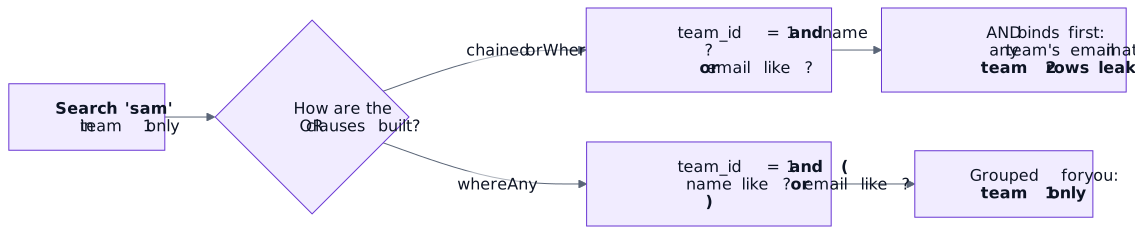
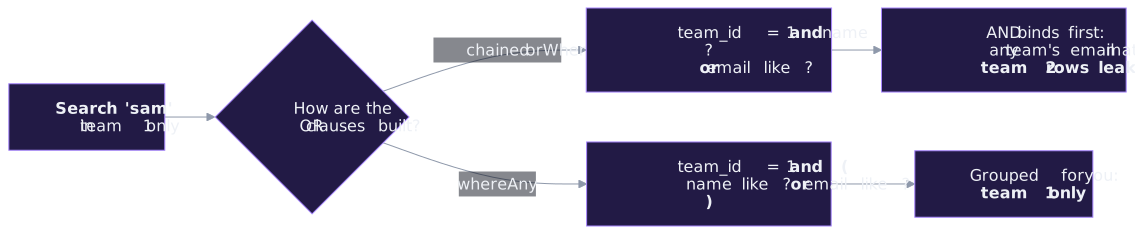
Contact::where('team_id', 1)
    ->where('name', 'like', '%sam%')
    ->orWhere('email', 'like', '%sam%') // not grouped
    ->get();
SQL evaluates and before or, so that reads as “(team 1 and name matches) or (any team’s email matches)”. In the lab, it returned Samir from team 1 and Sam from team 2. The whereAny version returned Samir only.
| Method | SQL shape | Use it for |
|---|---|---|
whereAny($cols, $op, $value) | (a op ? or b op ? or c op ?) | Search boxes: match any column |
whereAll($cols, $op, $value) | (a op ? and b op ? and c op ?) | Thresholds: every column must pass |
whereNone($cols, $op, $value) | not (a op ? or b op ? or c op ?) | Exclusions: no column may match |
orWhereAny / orWhereAll / orWhereNone | same, joined with or | Adding a grouped alternative |
Two arguments: whereAny($cols, $value) | operator defaults to = | Exact lookups: phone or email |
whereAll reads nicely for stock alerts. In the lab, this returned only the mug, the one product low in every region:
DB::table('stock')->whereAll(['eu', 'us', 'asia'], '<', 5)->pluck('sku'); // ['MUG']Swap it for whereAny and you get every product low in at least one region (['MUG', 'TEE']).
Tip: Closures work in the column list
The list may also hold closures, each one becoming its own group inside the OR. It worked from the start; Laravel 11.22 (PR #52555) made it official with types and tests:
Contact::whereAny([
    fn ($query) => $query->whereLike('name', $term),
    fn ($query) => $query->whereLike('email', $term),
])->get();
Handy when one branch needs a different operator or a subquery. Read the gotchas before you put a scope in there.
Real-world example: a team-scoped Inertia contacts search#
A CRM-style contacts page. The user types in one box; you match name, email or phone, never outside their team, and keep ?search= in the pagination links.
public function index(Request $request): Response
{
    $search = $request->string('search')->trim()->toString();

    return Inertia::render('Contacts/Index', [
        'contacts' => Contact::query()
            ->where('team_id', $request->user()->current_team_id)
            ->when($search !== '', fn ($query) => $query->whereAny(
                ['name', 'email', 'phone'], 'like', "%{$search}%"
            ))
            ->orderBy('name')
            ->paginate(15, ['id', 'name', 'email', 'phone'])
            ->withQueryString(),
        'filters' => ['search' => $search],
    ]);
}
We ran this controller logic in a Pest test with assertInertia: “sam” returned one team 1 contact, “+60” matched two phone numbers, an empty box returned the whole team, and first_page_url kept search=sam.
The Vue side sends the box value back with a short debounce. onWatcherCleanup clears the previous keystroke’s timer (our post on it has the full story):
<script setup lang="ts">
import { router } from '@inertiajs/vue3'
import { onWatcherCleanup, ref, watch } from 'vue'

const props = defineProps<{
    contacts: { data: { id: number; name: string; email: string; phone: string | null }[] }
    filters: { search: string }
}>()

const search = ref(props.filters.search)

watch(search, (value) => {
    const timer = setTimeout(() => {
        router.get('/contacts', { search: value || undefined }, {
            preserveState: true,
            preserveScroll: true,
            replace: true,
            only: ['contacts', 'filters'],
        })
    }, 300)
    onWatcherCleanup(() => clearTimeout(timer))
})
</script>

<template>
    <input v-model="search" type="search" placeholder="Name, email or phone" />
    <ul>
        <li v-for="contact in contacts.data" :key="contact.id">{{ contact.name }} · {{ contact.email }}</li>
    </ul>
</template>
Multi-word search: one whereAny per word#
Users type “sara acme” and expect a contact whose name has “sara” and whose notes or email mention “acme”. Call whereAny once per word; each call is its own group, joined with and:
foreach (preg_split('/\s+/', $search, -1, PREG_SPLIT_NO_EMPTY) as $word) {
    $query->whereAny(['name', 'email', 'notes'], 'like', "%{$word}%");
}
// where (name like ? or email like ? or notes like ?)
//   and (name like ? or email like ? or notes like ?)
In the lab, “sara acme” found Sara at Acme and nobody else. Try writing that one with hand-nested closures before your coffee.
Gotchas#
Gotcha: whereNone drops rows with NULL columns
whereNone(['name', 'email', 'notes'], 'like', '%casino%') compiles to not (name like ? or email like ? or notes like ?). When notes is NULL, notes like ? is NULL, and not (false or false or NULL) is NULL, which SQL treats as “no”. In the lab, two clean contacts with empty notes vanished along with the spammer.
Wrap nullable columns: whereNone(['name', 'email', DB::raw("coalesce(notes, '')")], 'like', '%casino%') kept all four clean contacts. Column names and raw expressions are never bound, so never build them from request input.
An empty column list adds no filter. whereAny([], 'like', '%zzz%') compiled to plain where "team_id" = ? in the lab and returned the whole team. If the columns come from config or a “search in” dropdown, check the list is not empty before you call it.
Closures in the list get a query builder, not Eloquent. Each closure receives Illuminate\Database\Query\Builder, so model scopes are not there: fn ($q) => $q->vip() threw BadMethodCallException. Worse, fn ($q) => $q->whereHas('company') did not throw. The query builder’s dynamic where* handling turned it into where "has" = 'company', which returned zero rows on SQLite; MySQL and Postgres would reject the unknown has column instead. For relations, either use a subquery in the closure ($q->whereIn('company_id', DB::table('companies')->select('id')->whereLike('name', $term))) or keep the relation outside:
Contact::where('team_id', 1)->where(fn ($query) => $query
    ->whereAny(['name', 'email'], 'like', $term)
    ->orWhereHas('company', fn ($company) => $company->whereLike('name', $term)));
Both versions passed in the lab.
like is case-sensitive on Postgres. whereAny([...], 'like', ...) sends like as is. On Postgres, pass 'ilike' as the operator, or use whereLike closures, which compile to ilike on Postgres and like on MySQL.
A leading % skips normal indexes. That is fine for a few thousand contacts. On a big table, reach for a full-text index or Scout instead of adding more columns to the list.
Try it yourself#
See the parentheses Laravel adds for you
use App\Models\User;

Artisan::command('whereany:check', function () {
    $this->line(User::where('id', '>', 0)->where('name', 'like', '%a%')->orWhere('email', 'like', '%a%')->toSql());
    $this->line(User::where('id', '>', 0)->whereAny(['name', 'email'], 'like', '%a%')->toSql());
});php artisan whereany:checkThe first line has no parentheses around the or. The second does. Now grep your app for orWhere( and check each one sits inside a closure.
How useful is this?#
| Score | |
|---|---|
| Time saved per use | ★★★☆☆ Five lines of closure become one |
| How often you’ll reach for it | ★★★★★ Every search box, filter bar and admin table |
| Risk if misused | ★★☆☆☆ NULLs in whereNone, empty column lists |
| Overall | 4 / 5: small syntax, and it removes the most common tenant-leak bug in search code |
Recap#
whereAnymatches any column,whereAllevery column,whereNoneno column, each wrapped in its own parentheses.- Same SQL as the hand-written
where(fn ...)closure, so swapping is safe; the ungroupedorWhereversion leaked a team 2 row in our lab. - Use one
whereAnyper word for multi-word search, and closures in the list for per-column operators. - Mind NULLs in
whereNone, empty column lists, closures that are not Eloquent, andilikeon Postgres. - Tested with 14 Pest tests in a scratch Laravel 13.39 app, including an Inertia endpoint.
FAQ#
Which Laravel version has whereAny and whereAll?
Laravel 10.47 (March 2024) added whereAny and whereAll. whereNone came in Laravel 11.19 (July 2024). Closures in the column list are supported and typed since 11.22. We tested on 13.39.
Is whereAny slower than writing the orWhere closure myself?
No. It builds the same nested where clauses, and in our lab the SQL string and bindings were identical. Speed depends on your indexes, not on which method wrote the SQL.
Can I search a relationship column with whereAny?
Not with whereHas inside it: closures get a query builder, and whereHas silently becomes where has = ?. Use a whereIn subquery inside the closure, or wrap whereAny and orWhereHas together in a where(fn ...) closure.
Why does whereNone skip rows I expected?
If any listed column is NULL, the NOT (...) expression becomes NULL and the row is filtered out. Wrap nullable columns in coalesce(column, '') with DB::raw(), as shown in the gotchas.
Does whereAny work with DB::table() as well as Eloquent?
Yes. It lives on the query builder, and Eloquent forwards the call, so DB::table('stock')->whereAll(...) and Contact::whereAny(...) both work.
Next steps#
- Search one column from a Vue field, the single-column version of this search
- Vue onWatcherCleanup, for the debounced search box
- Laravel + Vue pagination, to keep
?search=on every page link - Laravel docs: Where Any / All / None clauses
Sources#
- Laravel 13 docs: Where Any / All / None clauses
- Laravel 13 docs: Logical grouping
- laravel/framework PR #50344: Add whereAll and whereAny (Laravel 10.47)
- laravel/framework PR #52260: Add whereNone (Laravel 11.19)
- laravel/framework PR #52555: whereAny closures (Laravel 11.22)
- laravel/framework v10.47.0 release
- Source:
Illuminate\Database\Query\Builder