Your embeddings job failed at 3 a.m., failover quietly saved it, and your dashboard shows nothing. Your CI build has been “generating Wayfinder types” for 30 minutes because it’s trying to reach a database that doesn’t exist there.
This week’s small releases fix both. Here’s everything that shipped in the Laravel and Inertia world since last Monday, in one short read.
TL;DR
- Laravel AI SDK 1.2.2 fires an event when an embeddings, image, audio, transcription, reranking or classification call fails:
EmbeddingsFailed,ClassificationFailedand friends. They fire even when failover rescues the call. - AI SDK 1.2.2 and 1.2.3 also bring classification to the
openai-compatibledriver and image classification to TypeSafe and OpenRouter, and fix a streaming bug with structured sub-agents. - Wayfinder 0.1.23 adds
wayfinder:generate --skip-database, so builds never open a database connection. The Vite plugin option isskipDatabase: true. - Laravel 12.70.0 backports
EncodedParameter, two query-builder hardening fixes and a Blade cache fix. Update if you’re still on 12.
The week at a glance#
| Package | Version | Released (UTC) | Should you hurry? |
|---|---|---|---|
laravel/ai | 1.2.2 | Oct 14 | Yes, if you use conversations on OpenAI, Azure or xAI |
laravel/ai | 1.2.3 | Oct 15 | Yes, if you’re on Laravel 12 with AI conversations |
laravel/wayfinder | 0.1.23 | Oct 16 | Only if your build has no database |
laravel/framework (12.x line) | 12.70.0 | Oct 13 | Yes, on Laravel 12 (query hardening) |
Heads up: On Laravel 13 already?
Everything in Laravel 12.70.0 was already on 13.x: EncodedParameter since 13.33, the query fixes since 13.35 and the Blade cache fix since 13.36. The newest 13.x release got its own post: Laravel 13.37: strict Rule::numeric(), queue filters and JPEG XL.
AI SDK 1.2.2: events for failed AI calls#
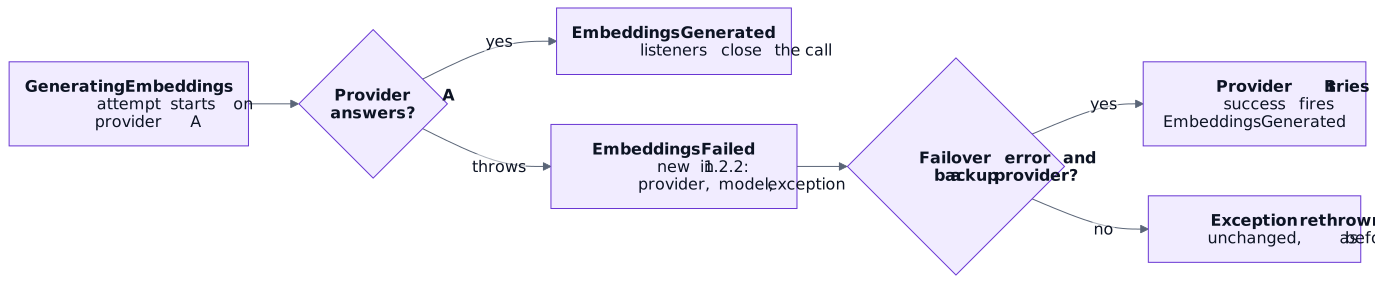
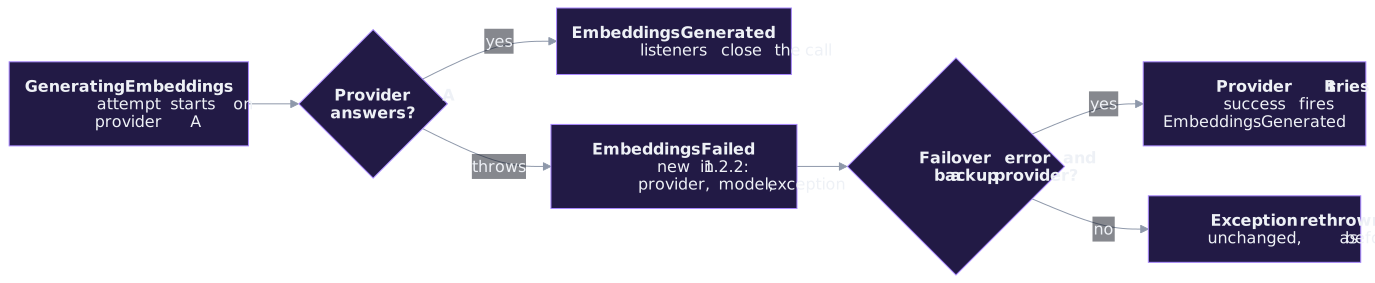
Until now, embeddings, images, audio, transcription, reranking and classification dispatched a “starting” event and a “done” event, but nothing when the call blew up. So a listener that opened a span or a log line could never close it on failure.
Version 1.2.2 adds six failure events: EmbeddingsFailed, ImageFailed, AudioFailed, TranscriptionFailed, RerankingFailed and ClassificationFailed. Each one carries the invocationId (the same one the start event had), the provider, the model, the prompt and the exception.
The file and vector store operations got the same treatment: StoringFileFailed, CreatingStoreFailed, AddingFileToStoreFailed and RemovingFileFromStoreFailed. They carry the store and file IDs instead of a model and prompt.
Log every failed AI call with one listener#
With event discovery, a listener in app/Listeners is registered from the type-hint on its handle method. A union type covers several events at once:
<?php

namespace App\Listeners;

use Illuminate\Support\Facades\Log;
use Laravel\Ai\Events\ClassificationFailed;
use Laravel\Ai\Events\EmbeddingsFailed;
use Laravel\Ai\Events\ImageFailed;

class ReportFailedAiCall
{
    public function handle(EmbeddingsFailed|ClassificationFailed|ImageFailed $event): void
    {
        Log::warning('AI call failed', [
            'invocation' => $event->invocationId,
            'provider' => $event->provider->name(),
            'model' => $event->model,
            'error' => $event->exception->getMessage(),
        ]);
    }
}
Nothing else changes: the exception is rethrown exactly as before, so your existing try/catch blocks and failover setup keep working.
Gotcha: A failed event doesn't mean the user saw an error
The events fire once per failed attempt, including attempts that failover recovers from. In our test, provider A returned a 503, the backup answered, and we got one EmbeddingsFailed (provider A) plus one EmbeddingsGenerated (the backup). Alert on the rate of failures per provider, not on every single event.
Prove it in your own test suite
use Illuminate\Support\Facades\Event;
use Illuminate\Support\Facades\Http;
use Laravel\Ai\Embeddings;
use Laravel\Ai\Events\EmbeddingsFailed;

test('a failed embeddings call is reported', function () {
    config()->set('ai.providers.local', [
        'driver' => 'openai-compatible',
        'url' => 'https://ai.test/v1',
        'key' => 'test',
        'models' => ['embeddings' => ['default' => 'local-embed', 'dimensions' => 8]],
    ]);

    Event::fake([EmbeddingsFailed::class]);
    Http::fake(['ai.test/*' => Http::response(['error' => ['message' => 'boom']], 500)]);

    expect(fn () => Embeddings::for(['hello'])->generate(provider: 'local'))
        ->toThrow(Exception::class);

    Event::assertDispatched(EmbeddingsFailed::class, fn ($e) => $e->model === 'local-embed');
});
Classification on more providers (1.2.2 and 1.2.3)#
Classification arrived in AI SDK 1.2, on OpenAI’s decisions endpoint. Two patches widen where it runs.
1.2.2: the openai-compatible driver. Some OpenAI-compatible servers implement the decisions endpoint too. The driver now sends the same /decisions request to your configured url. There is no default classification model, so set one:
'providers' => [
    'local' => [
        'driver' => 'openai-compatible',
        'url' => env('LOCAL_AI_URL'),
        'key' => env('LOCAL_AI_API_KEY'),
        'models' => [
            'classification' => ['default' => env('LOCAL_AI_CLASSIFIER')],
        ],
    ],
],use Laravel\Ai\Classification;
use Laravel\Ai\Classification\Boolean;
$result = Classification::of($ticket->body)
->question('urgent', new Boolean('Does this ticket need an immediate response?'))
->classify(provider: 'local');
$result['urgent']->isTrue(threshold: 0.8);1.2.3: images on TypeSafe and OpenRouter. Image attachments used to throw on both. Now the same Classification::of($text, $images) call works on OpenAI, TypeSafe and OpenRouter. On OpenAI, images attached under a string key are sent with their name, so a question can say “the front photo”.
Tip: Classification is still experimental
The official docs flag the classification API as experimental, so it may change in a minor release. At the time of writing, the docs’ provider list and event list don’t mention these 1.2.2/1.2.3 additions yet. The pull requests in Sources are the reference.
Smaller AI SDK fixes you may have hit#
| Fix | Version | Who it affects |
|---|---|---|
| Structured-output sub-agents run unstreamed when the parent streams | 1.2.2 (#1117) | You stream an agent whose tools include a structured-output agent. The tool result was “Agent failed: Streaming structured output is not currently supported.” |
| A failed turn’s interrupted tool result keeps its call ID | 1.2.2 (#1133) | Conversations on OpenAI, Azure OpenAI or xAI that got stuck returning HTTP 400 after a failed turn. They continue on the next prompt, no data fix needed. |
Conversation and ConversationMessage are non-incrementing again on Laravel 12 | 1.2.3 (#1137) | Laravel 12 apps that create conversations through Eloquent. The string ID was overwritten with the database row ID. |
The sub-agent fix is a fallback, not streamed structured output: the sub-agent answers in one piece, while InvokingTool and ToolInvoked still fire.
composer update laravel/ai
composer show laravel/ai | grep versions   # * v1.2.3
Wayfinder 0.1.23: generate types without a database#
Wayfinder types route model bindings by reading your table schema. In a build container with no database, every bound model waits for the connection to time out, twice, because Laravel retries it. The PR author reports generations that should take a minute hanging for more than 30.
The new flag skips the schema and reads the model’s @property docblocks instead:
Build needs a database, then 0.1.23, no database:
RUN php artisan wayfinder:generateRUN php artisan wayfinder:generate --skip-databaseIf you generate through Vite, @laravel/vite-plugin-wayfinder 0.1.11 (same day) passes the flag for you:
import { wayfinder } from '@laravel/vite-plugin-wayfinder'
import vue from '@vitejs/plugin-vue'
import laravel from 'laravel-vite-plugin'
import { defineConfig } from 'vite'

export default defineConfig({
    plugins: [
        laravel({ input: ['resources/js/app.ts'], refresh: true }),
        wayfinder({ skipDatabase: true }),
        vue(),
    ],
})
The types are only as good as your docblocks. Here’s what we got for a posts/{post} route:
Post model docblock | Generated parameter type |
|---|---|
@property int $id | number |
| none | string | number |
Gotcha: The flag in the PR text is not the one that shipped
The pull request description (and the Vite plugin PR) say --model-docblocks / modelDocblocks. The code that shipped in 0.1.23 uses --skip-database, and the Vite plugin option is skipDatabase. Use those, as the READMEs do.
Without the flag, nothing changes: Wayfinder still queries the schema and only falls back to docblocks if that query throws. More on typed routes in Wayfinder + Precognition and the QUERY method.
Laravel 12.70.0: backports for the 12.x line#
Three fixes from 13.x, for apps that haven’t upgraded yet.
EncodedParameter for pre-encoded route values. Since 12.69, %, ? and # in route parameters are always encoded. That’s a security fix, but it double-encoded values you had already encoded. Wrap those in EncodedParameter and they’re used as-is:
use Illuminate\Routing\EncodedParameter;

route('files.show', ['path' => 'report%202026.pdf']);
// .../files/report%25202026.pdf  (encoded again)

route('files.show', ['path' => new EncodedParameter('report%202026.pdf')]);
// .../files/report%202026.pdf
Query-builder hardening (#61838). whereRowValues() now rejects an invalid operator with an InvalidArgumentException, and cursor pagination now quotes an order column that contains parentheses instead of passing it through as raw SQL (aliased select expressions still work). Both matter if any part of a column name or operator ever comes from a request.
A Blade cache file per echo format (#61822). Compiled views now get a different file name when the echo format isn’t the default, for example after Blade::withoutDoubleEncoding() or while Markdown mail renders. Views compiled with one format are no longer reused with another.
composer update laravel/framework
php artisan view:clear
php artisan --version   # Laravel Framework 12.70.0
Upgrade notes#
- No breaking changes this week. Run
composer update(andnpm updatefor the Vite plugin), then your tests. - AI SDK: the new events are opt-in, nothing fires that you don’t listen to. If you alert on them, remember they include attempts that failover recovered.
- Wayfinder: add
@propertydocblocks to bound models before turning on--skip-database, or those parameters fall back tostring | number. - Laravel 12:
php artisan view:clearafter the update is optional but tidy, since compiled view file names can change.
Recap#
- AI SDK 1.2.2 gives you
*Failedevents for every model operation, failovers included. - AI SDK 1.2.2 and 1.2.3 run classification on
openai-compatible, TypeSafe and OpenRouter, and fix three bugs in streaming and conversations. - Wayfinder 0.1.23:
--skip-database(orskipDatabase: truein Vite) for database-free builds. - Laravel 12.70.0:
EncodedParameterplus query and Blade fixes. On 13.x you already have them.
FAQ#
Why did I get an EmbeddingsFailed event when the request succeeded?
The events fire once per failed attempt. If failover moved the call to another provider, you get a failed event for the first provider and a generated event for the second.
Do the new AI failure events replace try/catch?
No. The exception is still rethrown unchanged. The events are for logging, metrics and tracing; your error handling stays where it is.
Is it --model-docblocks or --skip-database?
It is --skip-database in Wayfinder 0.1.23 and skipDatabase in the Vite plugin 0.1.11. The PR descriptions mention the earlier name.
I am on Laravel 13. Do I need anything from 12.70.0?
No. The same changes shipped in Laravel 13.33, 13.35 and 13.36.
Is classification safe to use in production?
It works, but the docs mark it experimental, so pin your laravel/ai version and read the release notes before you update.
Next steps#
- Laravel AI SDK 1.2: Skills, tool approval and Cohere, where classification first landed.
- Laravel AI SDK 1.2.1: Stop middleware for agent runs
- Wayfinder + Precognition catch up with Laravel’s QUERY routes
- Laravel AI SDK docs: events
Sources#
- Laravel AI v1.2.2 release: PR #1090 (failure events), PR #1128 (openai-compatible classification), PR #1117 (structured sub-agents), PR #1133 (call id)
- Laravel AI v1.2.3 release: PR #1137 (non-incrementing models), PR #1134 (image classification)
- Laravel AI SDK docs: classification, OpenAI-compatible providers and events
- Laravel events docs: union-type listeners and discovery
- Wayfinder v0.1.23 release, PR #331, README
- Vite plugin Wayfinder v0.1.11, PR #34
- Laravel v12.70.0 release: PR #61871 (EncodedParameter), PR #61838 (query fixes), PR #61822 (Blade cache)
- Laravel Blade docs: HTML entity encoding and cursor pagination