
You add a drafts() relation, wire a “New draft” button in Vue, click it, and the list stays empty. The row is in the database. It just says published, because a where() filters what you read but does nothing for what you write. Since Laravel 11.40, one method fixes both sides: withAttributes().
TL;DR
- Write
$this->posts()->withAttributes(['status' => 'draft'])instead of->where('status', 'draft'). Reads getwhere "posts"."status" = 'draft', andcreate(),make(),save(),createMany(),firstOrCreate(),updateOrCreate()and model factories all setstatus = draft. - Attributes you pass to
create()still win when they are fillable. Keep the scoped column out of your validation rules and nobody can create a published post throughdrafts(). asConditions: false(Laravel 12.4) makes it a default for new rows without filtering reads.- It also works in a local scope (
Post::draft()->create()), but there the value goes through$fillable, unlike on a relation.
What withAttributes() is and why people miss it#
withAttributes() is a method on the Eloquent builder. It does two things with one array: it adds a where per key, and it remembers the values as “pending attributes” that get stamped on every model created through that builder.
public function posts(): HasMany
{
    return $this->hasMany(Post::class);
}

public function drafts(): HasMany
{
    return $this->posts()->withAttributes(['status' => PostStatus::Draft]);
}
It landed in Laravel 11.40 (January 2025, PR #53720). Laravel 11.42 fixed it for cast attributes like enums (PR #54422), 12.4 added asConditions (PR #55199) and 12.11 taught model factories to use it (PR #55558).
People miss it because it lives in a short subsection called “Scoped Relationships” in the relationships docs, and because the where() version looks correct. It passes every read test you write. The bug only shows up on the first write.
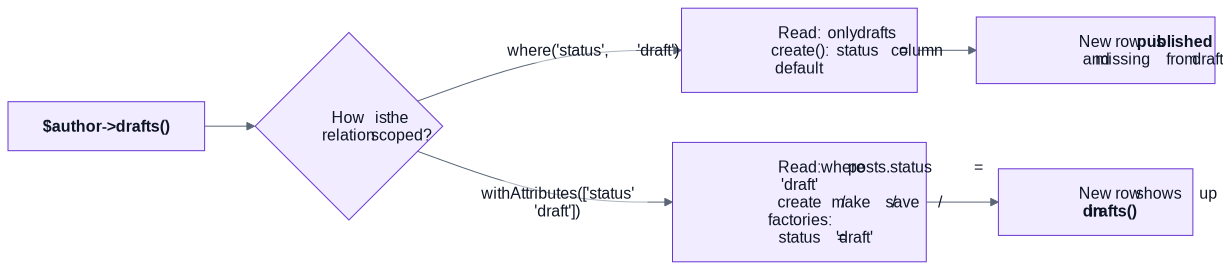
The usual way vs withAttributes()#
Both relations return the same rows. Only one creates the rows you expect.
where(): reads fine, writes published, then withAttributes(): reads and writes drafts:
public function drafts(): HasMany
{
    return $this->posts()->where('status', PostStatus::Draft);
}

$post = $author->drafts()->create(['title' => 'Oops']);

$post->fresh()->status;     // PostStatus::Published (column default)
$author->drafts()->count(); // 0, it vanishedpublic function drafts(): HasMany
{
return $this->posts()->withAttributes(['status' => PostStatus::Draft]);
}
$post = $author->drafts()->create(['title' => 'New draft']);
$post->fresh()->status; // PostStatus::Draft
$author->drafts()->count(); // 1The SQL for reads is what you’d write by hand, with the column already qualified, so joins don’t turn it ambiguous:
select * from "posts" where "posts"."author_id" = 1 and "posts"."author_id" is not null and "posts"."status" = 'draft'->where('status', 'draft') | ->withAttributes(['status' => 'draft']) | |
|---|---|---|
Reads (get, count, with('drafts')) | filtered | filtered (qualified column) |
create(), createMany() | column default | draft |
make(), save(new Post) | column default | draft (unless already set on the model) |
firstOrCreate(), updateOrCreate() | finds drafts, creates published | finds and creates drafts |
Author::factory()->has(Post::factory(), 'drafts') | factory default | draft (12.11+) |
update([...]) through the relation | only drafts | only drafts |
Every row in that table is a test in our lab. You can also chain it: $this->drafts()->withAttributes('featured', true) gives you featuredDrafts() with both columns set on create, and a null value turns into whereNull on read and null on create.
Real-world example: a Vue drafts page#
An editor has a “Drafts” tab. The Vue page lists drafts and has a one-field form to start a new one.
use Inertia\Inertia;

class DraftController
{
    public function index(Request $request)
    {
        return Inertia::render('Drafts/Index', [
            'drafts' => $request->user()->drafts()->latest('id')->get(['id', 'title']),
        ]);
    }

    public function store(Request $request)
    {
        $data = $request->validate([
            'title' => ['required', 'string', 'max:120'],
        ]);

        $request->user()->drafts()->create($data);

        return back();
    }
}<script setup lang="ts">
import { useForm } from '@inertiajs/vue3'
defineProps<{ drafts: { id: number; title: string }[] }>()
const form = useForm({ title: '' })
const submit = () => form.post('/drafts', { onSuccess: () => form.reset() })
</script>
<template>
<form @submit.prevent="submit">
<input v-model="form.title" placeholder="Working title" />
<button :disabled="form.processing">New draft</button>
<p v-if="form.errors.title">{{ form.errors.title }}</p>
</form>
<ul>
<li v-for="draft in drafts" :key="draft.id">{{ draft.title }}</li>
</ul>
</template>After the redirect, Inertia reloads the page props, and the new draft is in the list because it really is a draft. The controller never mentions status. The relation owns that rule, so the next endpoint that creates a draft (an import, a “duplicate” button, a seeder) gets it right too.
We also posted {"title": "From Vue", "status": "published"} to the same route in a test. The response said draft: validate() only returns the keys you have rules for, so the extra field never reached create().
Tip: The factory gets it for free
Since Laravel 12.11, Author::factory()->has(Post::factory()->count(3), 'drafts')->create() creates three drafts even if PostFactory says published. The same goes for magic methods like Page::factory()->hasCurrentVersion() on a hasOne with withAttributes(['is_current' => true]). A state you pass explicitly still wins.
Gotchas#
Explicit attributes win. Pending attributes are defaults. If status is fillable and you pass it, your value is used: $author->drafts()->create(['title' => 'x', 'status' => 'published']) creates a published post that drafts() can’t see. This is the real trap with $request->validated(): add status to the rules of a shared form request and the drafts endpoint can publish. Keep the scoped column out of the rules for that endpoint.
save() respects what’s already on the model. $author->drafts()->save(new Post(['status' => 'published'])) keeps published. Pending attributes only fill keys the model doesn’t have yet.
On a relation, $fillable doesn’t apply to pending attributes. With status not fillable, $author->drafts()->create(['title' => 'x']) still saved draft in our lab: HasMany sets pending attributes with setAttribute() after the fill.
Gotcha: In a local scope, pending attributes are mass-assigned
withAttributes() also works outside relations, for example in a local scope: Post::draft()->create([...]). There the pending attributes are merged into the create array and go through fill(). On a model where status isn’t fillable, the scope’s draft was silently dropped and the row came out published. With Model::preventSilentlyDiscardingAttributes() it threw a MassAssignmentException instead, which is one more reason to keep strict mode on.
asConditions: false is a default, not a scope. $this->posts()->withAttributes(['status' => 'draft'], asConditions: false) sets draft on new rows but returns every post on read. Useful for a “new posts start as drafts” rule; wrong for a drafts() tab.
It’s about the related table. On a belongsToMany, withAttributes(['kind' => 'admin']) filters and fills the related model’s kind column (teams.kind in our test), not the pivot. For pivot columns, reach for wherePivot() and withPivotValue().
Version check. On Laravel older than 11.40 the method doesn’t exist on relations. Before 12.4, there’s no asConditions argument, and before 12.11, factories ignore it.
Try it yourself#
Find relations that will create the wrong rows
grep -rnE 'return \$this->[a-zA-Z]+\(\)->where\(' app/ModelsEach hit is a scoped relation built with where(). If anything ever calls create(), save() or a factory through it, swap the where() for withAttributes() and add one test: create through the relation, then assert the relation’s count() went up.
How useful is this?#
| Score | |
|---|---|
| Time saved per use | ★★★★☆ One line replaces repeated 'status' => ... in every controller, job and factory |
| How often you’ll reach for it | ★★★★☆ Any drafts / featured / current / active style relation |
| Risk if misused | ★★☆☆☆ Explicit fillable values override it; local scopes go through $fillable |
| Overall | 4 / 5: a quiet bug fix you add once per relation and stop thinking about |
Recap#
- A
where()on a relation filters reads only;create()through it writes the column default. withAttributes()adds the qualifiedwhereand sets the value oncreate,make,save,createMany,firstOrCreate,updateOrCreateand factories.- Values you pass explicitly win, so keep the scoped column out of the endpoint’s validation rules.
asConditions: falsegives you the default without the filter.- In a local scope, pending attributes are mass-assigned and need to be fillable.
FAQ#
Which Laravel version has withAttributes() on relationships?
Laravel 11.40 (January 2025, PR #53720). The asConditions argument came in 12.4 and factory support in 12.11. We tested on Laravel 13.40.
Does withAttributes() work with enum casts?
Yes. Pass the enum case, for example ['status' => PostStatus::Draft]. Laravel 11.42 fixed casts with withAttributes() (PR #54422), and our lab used a backed enum cast throughout.
Can a user override the scoped value through create()?
Only if the value reaches create() and the attribute is fillable. Values passed to create() win over pending attributes, so do not include the scoped column in that endpoint’s validation rules.
What does asConditions: false do?
It keeps the pending attribute for new models but skips the where clause, so the relation reads every row and only new rows get the default.
Does it set pivot columns on belongsToMany?
No. It filters and fills columns of the related table. Use wherePivot() and withPivotValue() for pivot columns.
Next steps#
- Model::shouldBeStrict(), so silently dropped attributes throw instead
- Eloquent chaperone(), the other relationship gem that saves you queries
- Form requests with Inertia, to keep validation rules tight per endpoint
- Laravel docs: Scoped relationships
Sources#
- Laravel 13 docs: Eloquent relationships, Scoped Relationships
- laravel/framework PR #53720: Add pending attributes (Laravel 11.40)
- laravel/framework PR #54422: Fix casts + withAttributes (Laravel 11.42)
- laravel/framework PR #55199: asConditions flag for withAttributes (Laravel 12.4)
- laravel/framework PR #55558: Factories use relationship pending attributes (Laravel 12.11)
- Source: Eloquent Builder::withAttributes()
- Source: HasOneOrMany::setForeignAttributesForCreate()