
You add an approvedMembers() relation with wherePivot('approved', 1), wire an “Add member” button in Vue, click it, and the list stays the same. The pivot row is in the database. It just says approved = 0, because wherePivot() filters what you read and does nothing for what you attach. The method that does both has been in Laravel since 5.6: withPivotValue().
TL;DR
- Write
$this->belongsToMany(Member::class)->withPivotValue('approved', 1)instead of->wherePivot('approved', 1). Reads getwhere "project_member"."approved" = 1, andattach(),create(),save()andsync()all setapproved = 1on the pivot. - Values you pass to
attach()still win. Keep the scoped column out of the endpoint’s validation rules and nobody can attach an unapproved member throughapprovedMembers(). sync(),detach()andupdateExistingPivot()on the scoped relation only see rows that already match the pivot filter. Pending memberships survive a sync of the approved list.- This is the pivot-column sibling of
withAttributes().withAttributes()fills the related model, not the pivot.
What withPivotValue() is and why people miss it#
withPivotValue() lives on belongsToMany (and morphToMany). It does two things with one column and value: it adds a wherePivot constraint, and it remembers the value so every new pivot row created through that relation gets it.
use Illuminate\Database\Eloquent\Relations\BelongsToMany;

public function members(): BelongsToMany
{
    return $this->belongsToMany(Member::class)
        ->withPivot('approved', 'role');
}

public function approvedMembers(): BelongsToMany
{
    return $this->members()->withPivotValue('approved', 1);
}

public function editors(): BelongsToMany
{
    return $this->members()->withPivotValue(['approved' => 1, 'role' => 'editor']);
}
It landed in Laravel 5.6 (February 2018, PR #22867). Laravel 10 fixed custom pivot models so the stamped value is applied when the relation builds a Pivot instance (PR #46559), including on hydration.
People miss it because the docs file it under “Filtering Queries via Intermediate Table Columns”, after wherePivot(), and because the wherePivot() version looks correct. It passes every read test you write. The bug only shows up on the first attach().
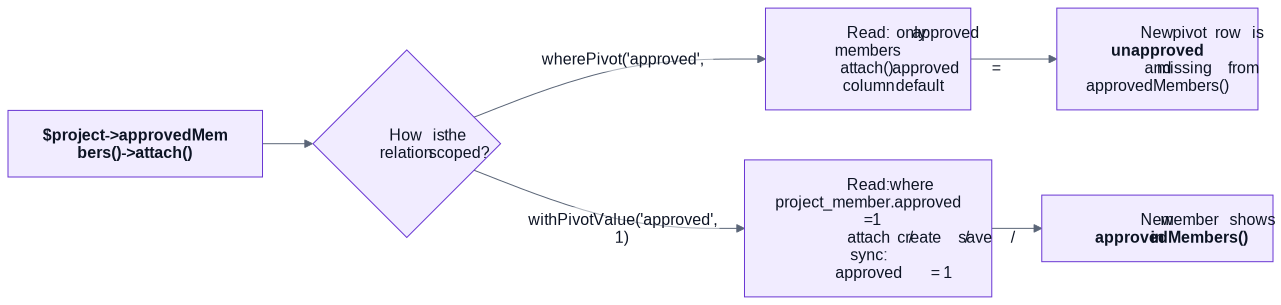
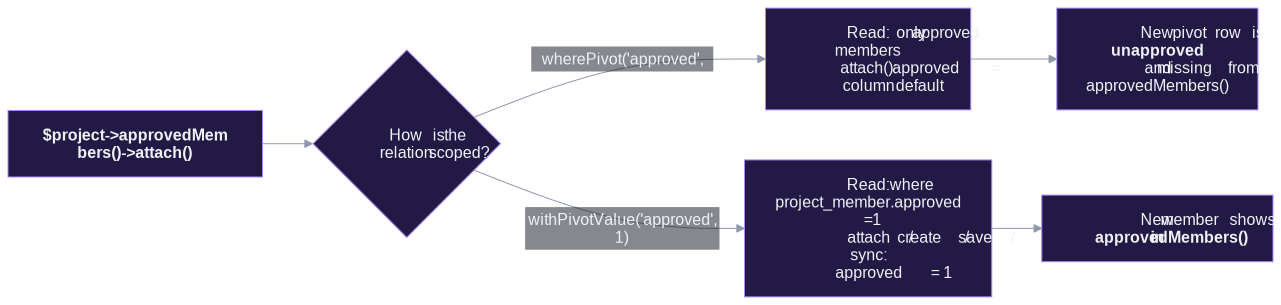
The usual way vs withPivotValue()#
Both relations return the same rows. Only one writes the pivot you expect.
wherePivot(): reads fine, writes unapproved, then withPivotValue(): reads and writes approved:
public function approvedMembers(): BelongsToMany
{
    return $this->members()->wherePivot('approved', 1);
}

$project->approvedMembers()->attach($member->id);

$project->approvedMembers()->count(); // unchanged
// project_member.approved is still 0, the column defaultpublic function approvedMembers(): BelongsToMany
{
return $this->members()->withPivotValue('approved', 1);
}
$project->approvedMembers()->attach($member->id);
$project->approvedMembers()->count(); // +1
// project_member.approved is 1The SQL for reads is a constraint on the pivot table, not on members. This is toRawSql() from our lab, with the extra withPivot('approved', 'role') columns included:
select "members".*,
  "project_member"."project_id" as "pivot_project_id",
  "project_member"."member_id" as "pivot_member_id",
  "project_member"."approved" as "pivot_approved",
  "project_member"."role" as "pivot_role"
from "members"
inner join "project_member"
  on "members"."id" = "project_member"."member_id"
where "project_member"."project_id" = 1
  and "project_member"."approved" = 1
->wherePivot('approved', 1) | ->withPivotValue('approved', 1) | |
|---|---|---|
Reads (get, count, with('approvedMembers')) | filtered | filtered (same where on the pivot) |
attach($id) | column default | approved = 1 |
create(), save() | column default | approved = 1 |
sync([$ids]) | attaches with the default; current set is only approved rows | attaches with approved = 1; current set is only approved rows |
$member->pivot->approved after a load | only if you also called withPivot('approved') | filled from the relation (even if it is not in the SELECT) |
whereRelation() / has() | yes, on approved members | yes, on approved members |
Every row in that table is a test in our lab. The array form sets more than one column: withPivotValue(['approved' => 1, 'role' => 'editor']) both filters and stamps both values. false and 0 are fine; only null is rejected.
The rest of the pivot family is for reads (and, like wherePivot(), not for writes): wherePivotIn, wherePivotNotIn, wherePivotBetween, wherePivotNull, wherePivotNotNull, plus orderByPivot / orderByPivotDesc. We used wherePivotIn('role', ['editor', 'admin']) and orderByPivotDesc('role') on top of approvedMembers() without surprises.
Real-world example: a Vue members page#
A project has a “Members” tab. The Vue page lists approved members and has a form to add one by id.
use App\Models\Project;
use Inertia\Inertia;

class ProjectMemberController
{
    public function index(Project $project)
    {
        return Inertia::render('Projects/Members', [
            'project' => $project->only('id', 'name'),
            'members' => $project->approvedMembers()
                ->orderBy('name')
                ->get()
                ->map(fn ($m) => [
                    'id' => $m->id,
                    'name' => $m->name,
                    'role' => $m->pivot->role,
                ]),
        ]);
    }

    public function store(Request $request, Project $project)
    {
        $data = $request->validate([
            'member_id' => ['required', 'integer'],
            'role' => ['nullable', 'string', 'max:40'],
        ]);

        $project->approvedMembers()->attach($data['member_id'], [
            'role' => $data['role'] ?? 'viewer',
        ]);

        return back();
    }
}<script setup lang="ts">
import { useForm } from '@inertiajs/vue3'
const props = defineProps<{
project: { id: number; name: string }
members: { id: number; name: string; role: string | null }[]
}>()
const form = useForm({ member_id: '', role: 'viewer' })
const submit = () =>
form.post(`/projects/${props.project.id}/members`, { onSuccess: () => form.reset() })
</script>
<template>
<form @submit.prevent="submit">
<input v-model="form.member_id" placeholder="Member id" />
<input v-model="form.role" placeholder="Role" />
<button :disabled="form.processing">Add member</button>
</form>
<ul>
<li v-for="m in members" :key="m.id">{{ m.name }} · {{ m.role }}</li>
</ul>
</template>After the redirect, Inertia reloads the page props, and the new member is in the list because the pivot really is approved. The controller never mentions approved. The relation owns that rule, so the next endpoint that adds an approved member (an invite accept, a seeder, a CLI command) gets it right too.
We also posted { "member_id": 3, "role": "viewer", "approved": 0 } to the same route in a test. The row still came out approved = 1: validate() only returns the keys you have rules for, so the extra field never reached attach().
Tip: withPivot() is still how you read other columns
withPivotValue('approved', 1) hydrates $member->pivot->approved from the value you defined, even when approved is not in the SELECT (our lab SQL had no pivot_approved alias, and the attribute was still 1). It does not select role, created_at or anything else. Keep ->withPivot('approved', 'role') on the relation when the Vue page needs those columns.
Gotchas#
Explicit attach attributes win. withPivotValue() sets defaults. $project->approvedMembers()->attach($id, ['approved' => 0]) writes 0, and the relation can no longer see the row. This is the real trap with a shared form request: add approved to the rules and the members endpoint can create a pending membership. Keep the scoped column out of the rules for that endpoint.
Gotcha: sync() and detach() only see matching pivot rows
newPivotQuery() reapplies the wherePivot constraints. That means $project->approvedMembers()->sync([$cy]) treats “currently attached” as “currently approved”. In our lab, Ana was approved, Ben was pending, and we synced to only Cy:
- Ana was detached (she was in the approved set and not in the new list)
- Cy was attached with
approved = 1 - Ben was left alone, still pending
$project->approvedMembers()->detach() removed Ana and left Ben. $project->approvedMembers()->updateExistingPivot($ben->id, ['role' => 'editor']) returned 0 and did not change Ben’s role; the same call for Ana returned 1.
If you mean “replace every membership”, call sync() on members(), not on approvedMembers(). If you mean “replace the approved set and leave pending invites alone”, the scoped sync() is the behaviour you want, but only if you know it is scoped.
null is not allowed. withPivotValue('revoked_at', null) throws InvalidArgumentException: The provided value may not be null. For “not revoked” reads, use wherePivotNull('revoked_at'). There is no withPivotValue equivalent that stamps null on attach.
withAttributes() does not set pivot columns. $project->belongsToMany(Member::class)->withAttributes(['kind' => 'admin']) filters and fills members.kind, and in our lab the new pivot row still had approved = 0. For pivot columns, use withPivotValue(). That is the same distinction the withAttributes() post ends on.
Custom pivot models are fine since Laravel 10. $this->belongsToMany(Member::class)->using(Membership::class)->withPivotValue('approved', 1) stamped approved = 1 on attach in our lab, and the related $member->pivot was our Membership class. That is the PR #46559 fix.
Try it yourself#
Find belongsToMany scopes that will attach the wrong pivot
grep -rnE 'belongsToMany\([^)]*\)->wherePivot\(' app/ModelsEach hit filters reads only. If anything ever calls attach(), create(), save() or sync() through it, swap wherePivot() for withPivotValue() (when the constraint is an equality) and add one test: attach through the relation, then assert the relation’s count() went up.
How useful is this?#
| Score | |
|---|---|
| Time saved per use | ★★★★☆ One line replaces ['approved' => 1] at every attach, create and sync site |
| How often you’ll reach for it | ★★★★☆ Approved members, admins, active subscriptions, any pivot flag or type |
| Risk if misused | ★★★☆☆ Scoped sync() / detach() ignore non-matching pivot rows; explicit attributes override it |
| Overall | 4 / 5: the pivot twin of withAttributes(), with a sharper sync trap |
Recap#
- A
wherePivot()on abelongsToManyfilters reads only;attach()through it writes the column default. withPivotValue()adds the samewhereand stamps the value onattach,create,saveandsync.- Values you pass explicitly to
attach()win, so keep the scoped column out of that endpoint’s validation rules. sync(),detach()andupdateExistingPivot()on the scoped relation only see rows that already match the filter.withAttributes()fills the related table;withPivotValue()fills the pivot.
FAQ#
Which Laravel version has withPivotValue()?
Laravel 5.6 (February 2018, PR #22867). Laravel 10 (PR #46559) made the stamped value apply when the relation builds a custom Pivot instance. We tested on Laravel 13.42.
What is the difference between wherePivot() and withPivotValue()?
Both add a where clause on the pivot table for reads. Only withPivotValue() also sets that value on new pivot rows created through the relation (attach, create, save, sync).
Do I still need withPivot() if I use withPivotValue()?
Yes, to select other pivot columns such as role or timestamps. The stamped column itself is hydrated from the value you defined, even when it is not in the SELECT.
What happens if I sync() through the scoped relation?
Only pivot rows that already match the filter count as currently attached. Other rows on the same pivot table, such as pending memberships, are left alone. Use members()->sync() when you mean every membership.
Can withPivotValue() set a null?
No. A null value throws InvalidArgumentException. Use wherePivotNull() for reads. To stamp a non-null default and still allow nulls on some rows, that combination is not what this method is for.
Does this work on morphToMany?
Yes. withPivotValue() lives on BelongsToMany, which MorphToMany extends, so morphToMany()->withPivotValue() gets the same filter-and-stamp behaviour.
Next steps#
- withAttributes() scoped relations, the related-table sibling of this method
- Eloquent chaperone(), including
chaperone()on a custom pivot - Form requests with Inertia, to keep validation rules tight per endpoint
- Laravel docs: Filtering queries via intermediate table columns
Sources#
- Laravel 13 docs: Eloquent relationships, Filtering Queries via Intermediate Table Columns
- laravel/framework PR #22867: Default attributes for pivot table during fetching and creating rows (Laravel 5.6)
- laravel/framework PR #46559: Make sure pivot model has previously defined values (Laravel 10)
- Source: BelongsToMany::withPivotValue()
- Source: InteractsWithPivotTable (attach, sync, detach, newPivotQuery)